TL;DR
A good business card needs clean visual hierarchy, one or two typefaces, 400gsm+ stock, and print-ready files exported as CMYK PDF at 300 DPI with 3mm bleed.
A good business card needs clean visual hierarchy, one or two typefaces, at least 400gsm stock, and a print-ready CMYK PDF at 300 DPI with 3mm bleed. Get those fundamentals right and the card sells your brand before you say a word. Below we break down each element (layout, typography, paper, colour, and file preparation) so you can create business card printing that people actually keep.
At Glasgow GFX, we print thousands of business cards every month from our Glasgow studio, and we see the same mistakes repeated time and again. The advice below draws on that experience. Every recommendation is actionable, and together they will move your card from forgettable to exceptional.
How should you structure the layout?
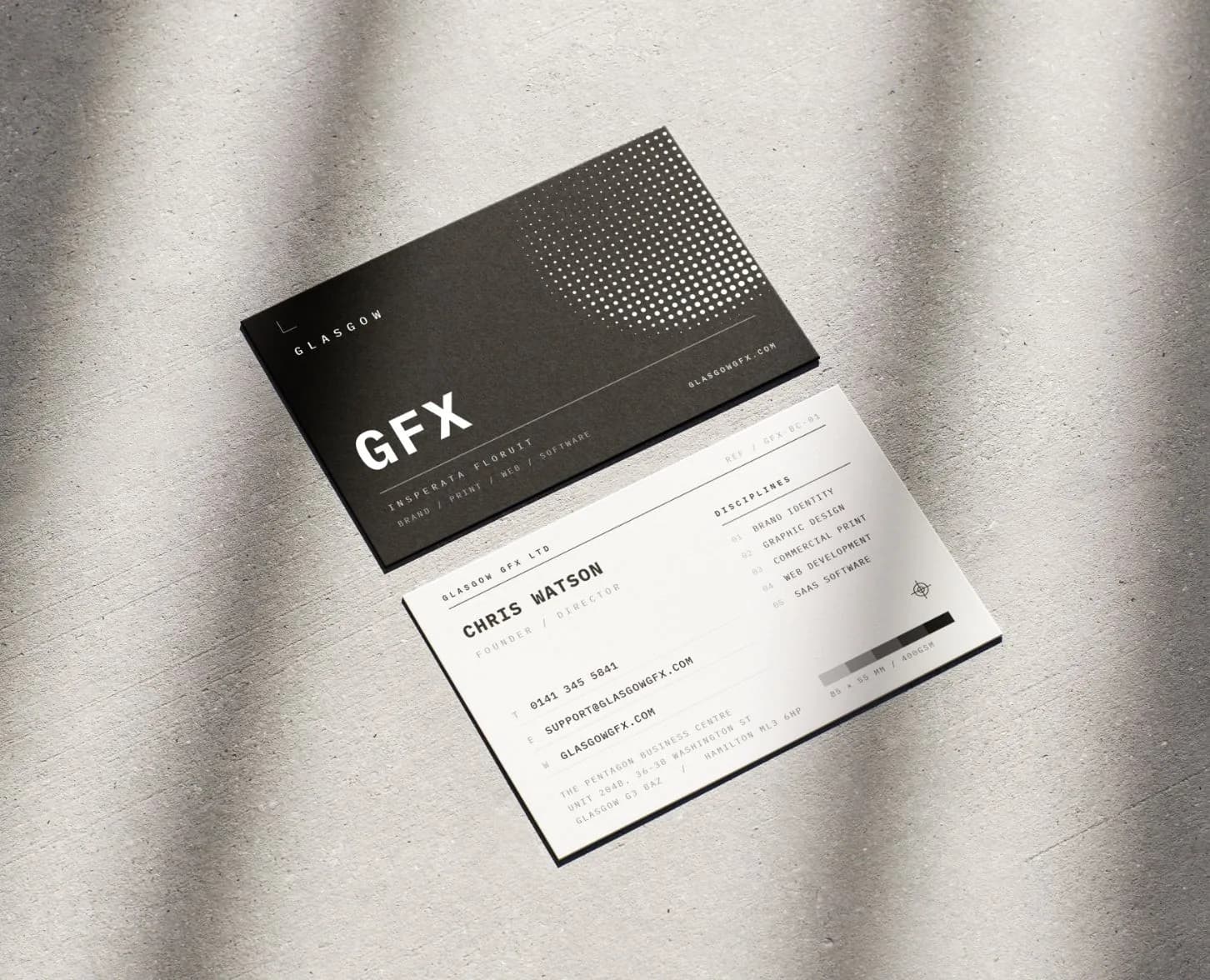
Visual hierarchy is the order in which a reader's eye moves through your design. On a business card, that order should be deliberate. Your name is typically the most important element, so it should be the largest or boldest piece of text. Your job title or role comes next, followed by contact details: phone, email, and website. If you include a QR code linking to your portfolio or booking page, position it where it supports rather than dominates the layout. A corner placement or a dedicated back-of-card position works well.
White space is not wasted space. It is one of the most powerful tools in your design arsenal. Generous margins and breathing room between elements make each piece of information easier to read and give the card a premium, confident feel. Resist the urge to fill every square millimetre. If you find yourself shrinking text to squeeze in another line, that is a sign to edit the content rather than the font size. A card that communicates five things clearly is far more effective than one that communicates ten things in a cramped jumble.
What typefaces work best for business cards?
Stick to one or two typefaces at most. A common and effective approach is to pair a sans-serif for your name and headings with a complementary serif or the same sans-serif at a lighter weight for contact details. This creates visual contrast without chaos. Avoid novelty, script, or overly decorative fonts. They may look interesting on screen but often become illegible at the small sizes a business card demands.
Consistency with your broader brand identity matters. If your website and signage use a particular typeface, your business card should follow suit. If you are still settling your look, getting your logo design in Glasgow finalised first gives every other piece a reference to work from. This repetition builds recognition and reinforces trust. Keep body text no smaller than 7pt for readability, and ensure there is strong contrast between text colour and background. Dark grey on white is always safe; light grey on a pastel background is a recipe for squinting.
What paper stock should you choose?
The stock you choose says as much about your brand as the design itself. A 400gsm uncoated card has a reassuring weight and a tactile, natural feel that works beautifully for consultants, architects, and creative professionals. For a modern, luxurious finish, soft-touch lamination adds a velvety texture that people instinctively want to hold onto, quite literally the opposite of a card that gets tossed in the bin. Browse our full range of print products to see the stock options available.
Finishing techniques can elevate a simple design into something memorable. Spot UV applies a high-gloss varnish to specific areas (your logo, a pattern, or a single word), creating a striking contrast against a matte background. Debossing presses your design into the card surface, adding a subtle sculptural quality. Linen and cotton stocks introduce texture and a handmade feel. These finishes add cost, but on a product you hand out face-to-face, the return on investment is immediate and tangible.
If you are unsure which combination suits your brand, order a sample pack or visit our Glasgow studio to feel the options in person. The difference between stocks is almost impossible to judge on screen. You need to hold them.
How do you choose the right colours?
Restraint is key. Choose two or three colours from your brand palette and use them with purpose. A single accent colour against a neutral background can be far more impactful than a rainbow of hues competing for attention. If your brand uses a bold, dark background (navy, charcoal, or black), make sure your text is set in white or a high-contrast light colour. Dark-on-dark is a common pitfall that looks dramatic on a backlit monitor but falls flat in print.
Always proof your colours on paper before committing to a full run. Screens display colour in RGB (light), while print uses CMYK (ink), and the translation between the two is never perfectly one-to-one. Vibrant greens, electric blues, and neon tones shift noticeably in CMYK. A printed proof lets you catch these shifts and adjust before hundreds or thousands of cards roll off the press. If colour accuracy is critical to your brand, ask about Pantone spot-colour printing for precise, repeatable results.
How do you prepare print-ready files?
Every print-ready business card file needs 3mm of bleed on all sides. Bleed is the area beyond the trim line where your background colour or imagery extends, ensuring there are no white edges after cutting. Equally important is the safe zone: keep all text and logos at least 3mm inside the trim line. Anything closer risks being clipped by the guillotine or sitting uncomfortably close to the edge.
Export your final artwork as a press-quality PDF with fonts embedded or outlined, images at 300 DPI, and colours converted to CMYK. If you are working in Canva, Illustrator, or InDesign, our file preparation guide walks you through the export settings step by step. Getting these technical details right avoids delays, reprints, and frustration, and it means your cards arrive looking exactly as you designed them.
Ready to Print?
A great business card is the intersection of thoughtful design, quality materials, and precise print production. At Glasgow GFX, we handle all three from our Glasgow studio, offering everything from standard business card printing to premium finishes like spot UV and soft-touch lamination. If you have a design ready, you can upload and order directly. If you are starting from scratch, our Glasgow graphic design team can build the artwork for you. If you just need help refining what you have or choosing the right stock, get in touch or request a quote. We are always happy to advise.
Design Your Business Cards
Design Your Business CardsKey Takeaways
- Lead with visual hierarchy: name largest, then role, then contact details, and leave generous white space.
- Stick to one or two typefaces and keep body text at 7pt minimum for readability.
- Choose 400gsm+ uncoated or soft-touch laminated stock for a premium, tactile feel.
- Use two or three brand colours with strong contrast. Always proof on paper before a full run.
- Export as CMYK PDF at 300 DPI with 3mm bleed and keep text inside the safe zone.